Stay organized with free printable monthly planner templates featuring three unique designs. Each undated template includes a two-page spread with weekly grids and specialized sections for notes, goals, or affirmations. Download PDF files optimized for US Letter paper (8.5″ x 11″). Print at home for instant planning solutions.
What’s Included in Your Monthly Planner Templates
Two-Page Spread Layout
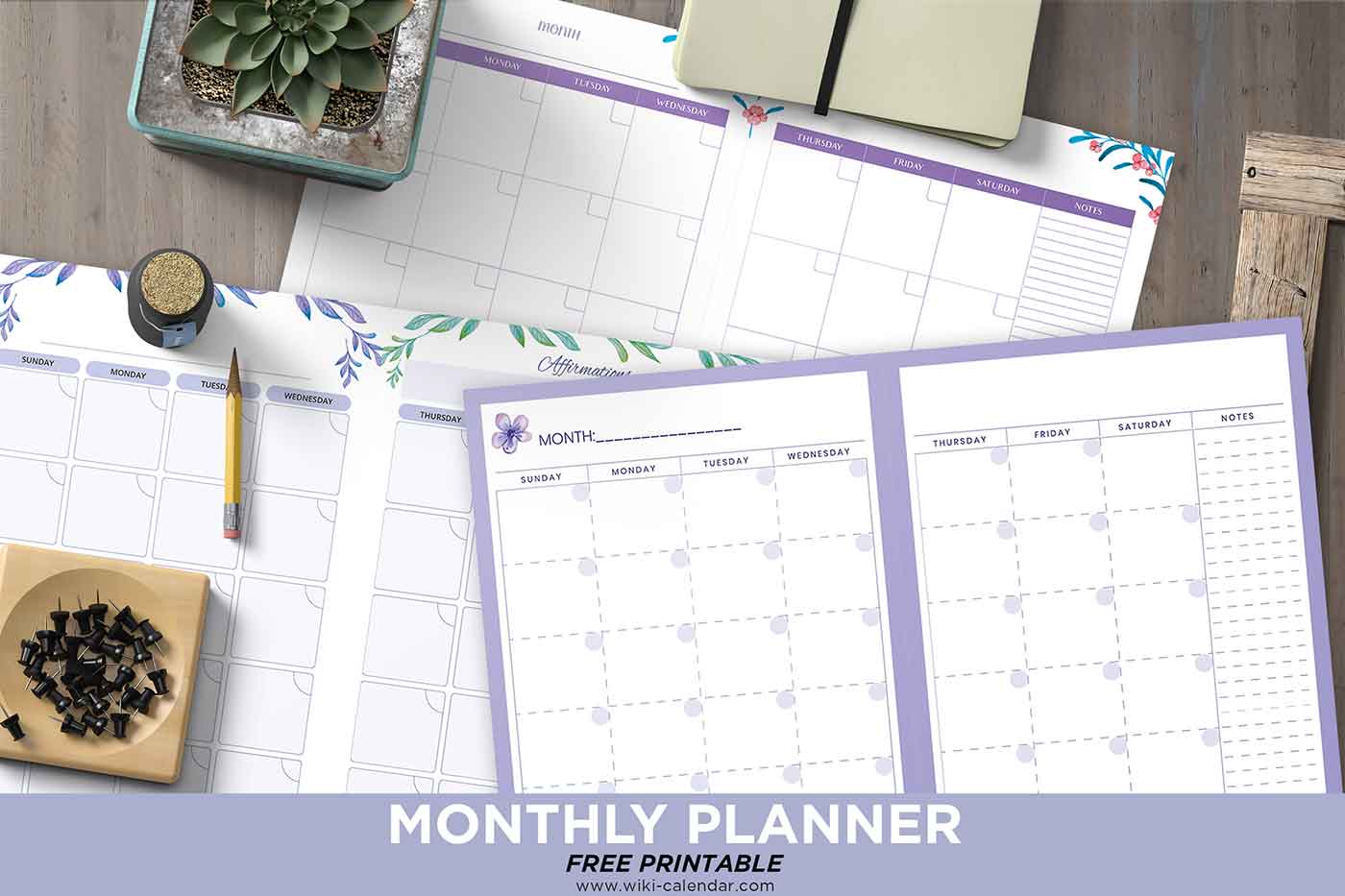
Each printable monthly planner template features a two-page spread design. The first page displays Sunday through Wednesday with individual day boxes for scheduling appointments, tasks, and notes. The second page continues with Thursday through Saturday, plus specialized sections that vary by template design.
Decorative Floral Borders
All three templates include decorative floral borders in purple, green, blue, and pink tones that add visual appeal without cluttering your planning space. The botanical designs create a calming planning environment while maintaining clear functionality for daily scheduling.
Flexible Undated Format
The undated format lets you fill in any month of any year. Start planning whenever you need without wasting pages. Print multiple copies for different months or restart your planning system anytime throughout the year.
Three Monthly Planner Design Options
Affirmations Design (Purple & Green Floral)
The first template features purple and green floral borders with dedicated space for daily positive statements, gratitude reflections, or motivational quotes. Use this template when you want to integrate mindfulness with time management. The affirmations section helps you maintain focus on personal growth alongside your daily tasks.
Goals & Insights Design (Purple with Flower Icon)
The second template includes a decorative flower icon, a three-goal tracker with checkboxes, and an end-of-month reflection section in elegant purple frames. Set your three main goals at the start of the month, then review your progress with end-of-month insights. This design suits goal-oriented planners who track monthly objectives.
Tasks Design (Blue & Pink Floral)
The third template showcases blue and pink floral elements with a dedicated tasks section and notes column. Use the tasks section for ongoing projects, shopping lists, or monthly priorities while the notes area captures important reminders. This design works well for task-driven users who need separate space for to-do lists.
How to Download and Print
Downloading Your Template
Download your preferred template design as a PDF file. Open the file in Adobe Reader, Preview (Mac), or your browser’s PDF viewer. Files are optimized for quick downloads and work on any device without special software.
Printing Your Monthly Planner
Print both pages on standard Letter-size paper using 24 lb paper or cardstock for increased durability. Use color printing to preserve the floral design details, or switch to grayscale to save ink while maintaining clear functionality. Most home inkjet and laser printers handle these files without issues.
Creative Ways to Use Your Planner
Hole-punch the printed pages to add them to three-ring binders for an integrated planning system. Scan the blank template and import it into digital note-taking apps like GoodNotes or Notability for iPad planning. Laminate your favorite design and write with dry-erase markers to create a reusable monthly planning board.
Best Printing Practices
Paper Selection Guide
Print these monthly planner templates on 20-24 lb copy paper for everyday use or 65-110 lb cardstock for professional durability. Heavier cardstock works well if you write with firm pressure or need planners that last all month without wear.
Professional Printing Options
Visit FedEx Office, Staples, or local print shops for volume printing or professional quality. Request premium color printing on cardstock for presentation-quality monthly planners. The undated format means you can print exactly the quantity you need without waste.

Good morning ☀️
I am in need of a website – Author Website. I am not good with doing graphic on the computer. I can draw. However, this is not in my lane. Can you email me and let me know what your cost would be to design my Author’s Website .
Hi Sharon, thanks so much for sharing these monthlies, I love them! =)
How do you add e pic to the calender
Good morning Sharon! I am also looking to create a website for my business. If you can help with some tips, I would greatly appreciate that, please email me at your earliest convenience. Thank you for all your hard work you have put into your planners and calendars, I wish you the best in all your endeavors! Congratulations on graduating!! 🙂
Hey Sharon,
I love all of your wiki calendars and I use them all the time. Congrats for making these
HI, SHARON. From country Malaysia. thank you very much for sharing your calendars with nice flowers design in it. makes me feel happy.. i dont have to create myself, save my time…good job for you good work …god bless you
thank you sharon!
Amazing. thanks for sharing
Thank you. This planner is really useful as it can print across 2 pages and I can write what I need and it is not squashed.
how do i print 4 months on one page?
Is there a printable calendar I can change to start on a Monday – Sunday and type in my notes in each day. THank you
I am a teacher and I sincerely appreciate all these lovely choices!!! High Quality Free Calendars AND Planners!!! Holy moly!! And I say this from the bottom of my heart: I LOVE THESE!!! I have been using them for years now and they keep me organized and up to date!!! Much gratitude to all our designers and staff who keep the ball rolling. You make our lives beautifully manageable.
how can i change the year (to 2026)?
Hello Sharon.
Great stuff !
TY
Ron